

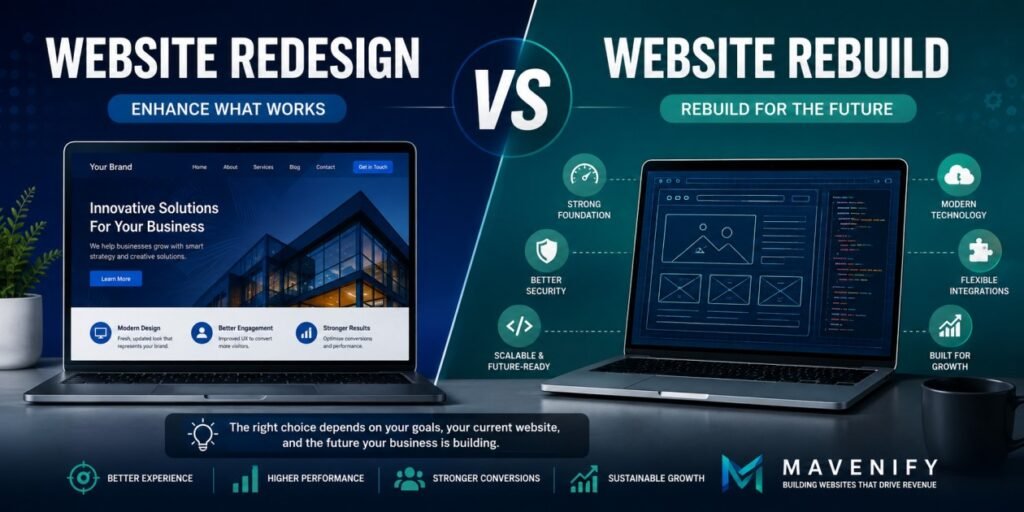
A website can look outdated without needing to be rebuilt from scratch. Likewise, a website with a modern visual appearance can still have technical limitations that make a deeper rebuild necessary. The real decision is not simply whether the website needs to look better, but whether its existing foundation can support the business’s current requirements and future direction.
A website redesign generally focuses on improving the existing website experience—its visual design, user experience, content presentation, navigation, branding, and conversion pathways—while retaining much of the underlying technical foundation. A website rebuild, on the other hand, involves replacing or substantially reworking that foundation when the existing architecture, technology, functionality, or infrastructure has become a constraint.
The distinction matters because choosing the wrong approach can create unnecessary cost and complexity. A business may spend heavily rebuilding a website when a targeted redesign would have solved the actual problems. Alternatively, redesigning an outdated foundation can result in a better-looking website that continues to suffer from the same performance, scalability, maintenance, or integration problems underneath.
This makes the decision an important part of Revenue-Focused Web Infrastructure™. The website needs to be evaluated not only as a visual experience, but as a digital system that supports customer journeys, marketing, conversions, business operations, and future growth.
In this guide, we’ll compare website redesign and website rebuild across design, architecture, performance, technology, integrations, scalability, cost, timelines, and business requirements so you can determine which approach makes the most sense for your website.
Table of Contents
What Is a Website Redesign?
A website redesign improves an existing website without necessarily replacing its entire technical foundation. The scope can range from visual improvements to substantial changes in user experience, content structure, navigation, and conversion pathways.
A Redesign Improves What Already Exists
A redesign typically starts with the assumption that the existing website has a foundation worth retaining. The underlying platform, architecture, database, integrations, or content management system may continue to serve the business adequately even though the website’s experience needs improvement.
The redesign may introduce a new visual identity, improved layouts, clearer navigation, responsive improvements, updated content presentation, stronger calls to action, or other changes designed to make the website more effective for its users.
This approach can be particularly appropriate when the existing website is technically stable but no longer represents the quality, positioning, or customer experience the business wants to provide.
A Redesign Can Go Beyond Visual Changes
The term redesign is sometimes interpreted as simply changing colours, fonts, images, and page layouts. In practice, a strategic redesign can address much more than visual appearance.
Information architecture, content hierarchy, navigation, mobile experience, page structure, conversion pathways, and user interactions can all be reconsidered as part of the redesign process.
The key limitation is that the underlying technical foundation may remain substantially intact. If that foundation is itself responsible for major performance, scalability, security, or functionality problems, a visual redesign alone may not be enough.
What Is a Website Rebuild?
A website rebuild involves replacing or substantially restructuring the technical foundation of an existing website. It becomes relevant when the current platform, architecture, codebase, integrations, or infrastructure prevents the website from meeting current or future requirements.
A Rebuild Addresses the Foundation
A website rebuild can involve migrating to a different platform, restructuring the architecture, replacing outdated code, rebuilding templates and components, redesigning integrations, restructuring content, or creating a new technical environment.
The objective is not simply to produce a different-looking website. A rebuild creates an opportunity to address problems that are difficult or impractical to solve within the existing architecture.
This can be particularly valuable when the website has accumulated years of technical dependencies, custom modifications, outdated functionality, or architectural decisions that make continued development increasingly difficult.
A Rebuild Does Not Necessarily Mean Starting With Nothing
Rebuilding a website does not mean every existing asset needs to be discarded. Valuable content, customer data, brand assets, integrations, URLs, functionality, and historical performance can often be assessed and selectively migrated into the new environment.
The rebuild process should therefore begin with an audit of what should be retained, improved, replaced, consolidated, or retired.
This makes a rebuild a strategic transition rather than simply a decision to throw away the existing website and start again.
Website Redesign vs Website Rebuild: What’s the Difference?
The most important distinction is where the problem exists. If the primary problems are related to the website experience while the underlying foundation remains capable, a redesign may be appropriate. If the technical foundation itself is limiting performance, functionality, scalability, or maintenance, a rebuild may be the stronger option.
Direct Comparison
| Factor | Website Redesign | Website Rebuild |
| Primary objective | Improve the existing website experience | Replace or substantially improve the underlying foundation |
| Visual design | Updated or redesigned | Usually redesigned as part of the rebuild |
| UX | Improved | Reconsidered alongside new architecture |
| Existing architecture | Usually retained | May be replaced or substantially restructured |
| Technology/platform | Often retained | May be changed |
| Performance | Targeted improvements | Deeper technical limitations can be addressed |
| Integrations | Usually retained or updated | Can be redesigned or replaced |
| Content | Refined or reorganized | Audited, migrated, restructured, or rewritten |
| Timeline | Generally shorter | Generally longer |
| Investment | Usually lower | Usually higher |
| Technical risk | Generally lower | Requires more planning and migration control |
| Best suited for | A sound foundation that needs improvement | A constrained, outdated, or technically problematic foundation |
The table provides a useful starting point, but there is no universal rule that says a certain type of website must always be redesigned or rebuilt. The right decision depends on the condition of the current website, the problems the business needs to solve, and the capabilities it will need in the future.
A website can also fall somewhere between the two approaches. Some projects require significant architectural improvements alongside a redesigned experience, while others can be resolved through targeted technical work without requiring a complete rebuild.
The important thing is to diagnose the underlying problem before deciding on the project type.
The Key Question: Is the Foundation Still Fit for Purpose?
The most useful question when evaluating a website is whether its existing foundation can support what the business needs next. A website may be visually dated but technically capable, or visually modern but built on an architecture that makes future development difficult.
This is why a website evaluation should consider technology, architecture, performance, integrations, content, security, maintainability, conversion requirements, and scalability—not just appearance.
If the foundation remains fit for purpose, a redesign may deliver substantial improvements without unnecessary disruption. If the foundation is creating persistent constraints, rebuilding may provide a more sustainable solution.
When Should You Choose a Website Redesign?
A redesign is often the right choice when the website’s underlying technology and architecture remain capable, but the experience no longer reflects the business, its customers, or its growth objectives.
Your Website Looks Outdated but Still Works Reliably
A website can become visually outdated without becoming technically obsolete. Branding may have evolved, competitors may offer more modern experiences, or customer expectations may have changed while the underlying platform continues to perform reliably.
In this situation, a redesign can refresh the visual language, layouts, typography, imagery, navigation, and content presentation without introducing the complexity of replacing the entire technical foundation.
The opportunity is to preserve what already works while improving the parts of the experience that no longer represent the business effectively.
The User Experience Needs Improvement
A website may contain the right information but still make it difficult for visitors to find, understand, or act on that information. Confusing navigation, weak content hierarchy, inconsistent layouts, and unclear calls to action can create friction throughout the customer journey.
A redesign can address these problems by restructuring the experience around user needs, important journeys, and the actions the business wants visitors to take. This is where Conversion-Focused Website Architecture can help connect UX decisions with the pathways that matter most to the business.
This is particularly valuable when the existing architecture can support the improved experience without requiring fundamental technical changes.
Your Brand Has Evolved
Businesses change. Their positioning, services, target audiences, visual identity, and value propositions can evolve significantly after the original website was launched.
When the website no longer communicates the current brand accurately, a redesign can bring the digital experience into alignment with the business without necessarily requiring a complete technical rebuild.
This can include updated messaging, visual identity, photography, content hierarchy, page layouts, service presentation, and other elements that influence how visitors perceive the organization.
Mobile and Responsive Experience Needs Improvement
A website that was designed for an earlier generation of devices may provide an inconsistent experience on modern smartphones and tablets. Navigation, spacing, forms, media, typography, and interactive elements can all become difficult to use when the responsive experience has not evolved with user behaviour.
If the underlying technology can support a modern responsive implementation, a redesign may be enough to address these problems without replacing the entire platform.
The key is to determine whether the problem is primarily with the experience or whether deeper technical limitations are preventing the required improvements.
When Should You Choose a Website Rebuild?
A rebuild becomes more appropriate when the existing website’s foundation is itself preventing the business from achieving its requirements.
The Technology Is Outdated or Restrictive
Older websites can depend on outdated platforms, frameworks, plugins, themes, or custom code that are difficult to maintain or extend. Even when the website continues to function, the underlying technology may make future improvements increasingly expensive or risky.
A rebuild creates an opportunity to move to a more appropriate technical environment and establish a cleaner foundation for future development.
The decision should be based on actual technical and business requirements rather than assuming that newer technology is automatically better.
Performance Problems Are Structural
Some performance issues can be addressed through targeted optimization, but others are rooted in the website’s architecture, codebase, hosting environment, excessive dependencies, or inefficient technical implementation.
When these underlying limitations prevent the website from reaching the required level of performance, repeatedly applying surface-level fixes may become less effective than addressing the foundation itself.
A rebuild can provide an opportunity to rethink the architecture, development approach, assets, integrations, and infrastructure around the performance requirements of the new website through High-Performance Website Development.
The Website Cannot Scale With the Business
A website that worked well when the business was smaller may become increasingly difficult to expand as new services, products, content, traffic, integrations, or functionality are introduced.
If adding new capabilities requires increasingly complex workarounds or creates problems elsewhere in the website, the existing architecture may no longer be suitable for the business’s direction.
A rebuild can establish a more scalable foundation that makes future additions easier to plan, develop, test, and maintain.
Integrations Have Become Difficult to Manage
Websites often accumulate integrations over time. CRM connections, payment systems, analytics platforms, scheduling tools, marketing technologies, APIs, and custom workflows can become difficult to maintain when they were added independently without a coherent architecture.
A rebuild provides an opportunity to audit these connections, remove unnecessary dependencies, redesign important data flows, and establish clearer integration boundaries. Our guide to Website Integrations explores how these connections can be designed as part of a broader website infrastructure.
The goal isn’t to connect more systems. It is to create a more reliable digital environment in which the systems the business actually needs can communicate effectively.
Maintenance Has Become a Constraint
If simple content changes, feature updates, bug fixes, or integrations require disproportionate development effort, the website may have accumulated technical debt that is limiting its usefulness.
A rebuild can address these structural problems by simplifying the architecture, replacing problematic dependencies, improving documentation, and creating a more maintainable development environment.
This can reduce the friction associated with future development and give the business greater flexibility as its requirements evolve.
How to Decide Between a Website Redesign and a Website Rebuild
The right decision starts with the problems the existing website needs to solve. Instead of choosing a redesign or rebuild based on appearance alone, businesses should evaluate the current technology, architecture, user experience, performance, integrations, content, and future requirements.
“User experience” encompasses all aspects of the end-user’s interaction with the company, its services, and its products.
Start With the Business Problem
Begin by identifying what is actually preventing the website from performing as expected. Is the problem primarily visual and experiential, or are technical limitations affecting performance, functionality, maintenance, integrations, or scalability?
A business that simply wants a more modern interface may not need a complete rebuild. On the other hand, if the website cannot support required functionality or has become increasingly difficult to maintain, changing the visual layer alone may only hide the underlying problem.
Defining the business problem first helps prevent unnecessary development work and creates a clearer basis for deciding how much of the existing website should be retained.
Evaluate the Existing Technical Foundation
Review the current platform, CMS, codebase, hosting environment, plugins or dependencies, database structure, integrations, security configuration, and overall architecture. The objective is to determine whether the foundation can support the website’s current requirements and the capabilities the business expects to add.
If the foundation is stable, maintainable, and capable of supporting the required improvements, a redesign may be sufficient. If fundamental limitations are preventing progress, a rebuild becomes more compelling.
This technical assessment is especially important when performance problems have persisted despite repeated optimization attempts or when simple changes require disproportionate development effort.
Evaluate Performance and Reliability
Look beyond whether individual pages appear to load quickly. Consider responsiveness, mobile behaviour, technical reliability, important customer journeys, server performance, integrations, and the stability of functionality such as forms, payments, bookings, and other critical interactions.
If the existing architecture can support the required improvements, targeted optimization and redesign may be appropriate. If performance and reliability problems are deeply connected to the underlying architecture, a rebuild may provide a more sustainable solution.
The goal is to understand whether performance issues are symptoms that can be addressed within the current foundation or evidence that the foundation itself needs to change.
Evaluate Integrations and Business Systems
Review the systems connected to the website and determine whether those integrations remain reliable, maintainable, and appropriate for the business. This can include CRM systems, analytics, payments, scheduling, marketing platforms, APIs, and automation workflows.
If the existing integrations work effectively and can support future requirements, they may be retained during a redesign. If they are creating technical constraints or have become difficult to manage, rebuilding the integration layer may be part of a larger website rebuild.
The assessment should also identify unnecessary dependencies and opportunities to simplify the digital environment.
Evaluate Conversion and Customer Journeys
A website may technically function well while still making it difficult for visitors to take important actions. Review navigation, content hierarchy, calls to action, forms, service pages, checkout or booking processes, and other journeys that influence conversion.
If the underlying technology can support a better experience, a redesign may be enough to address these issues. If the existing architecture prevents the required experience from being implemented effectively, a rebuild may be necessary.
This distinction helps businesses avoid confusing a design problem with an infrastructure problem.
Evaluate Content and Information Architecture
Content problems do not always require a complete rebuild. If the existing platform can support a better page structure, navigation, content hierarchy, and publishing workflow, a redesign can often address these areas without replacing the technical foundation.
However, if the current architecture makes it difficult to organize content logically, create new page types, manage relationships between content, or support the website’s future structure, the problem may be deeper than presentation.
In that situation, a rebuild can provide an opportunity to establish a cleaner information architecture that supports both the current website and the content the business expects to create in the future.
Consider the Cost of Keeping the Existing Foundation
The cost of a rebuild should not be compared only with the immediate cost of a redesign. Businesses should also consider the ongoing development effort required to maintain, optimize, troubleshoot, and extend the existing website.
A website that appears cheaper to retain can become more expensive over time if every new requirement requires workarounds, custom fixes, or increasingly complex development.
The better comparison is therefore the total cost of ownership and future development, rather than simply the initial project investment.
Consider the Business’s Next Three to Five Years
The right website decision should reflect where the business is going, not only where it is today. Consider planned services, products, markets, content growth, traffic, integrations, customer journeys, automation, and other capabilities the website may need to support.
If the existing foundation can accommodate those requirements with reasonable development effort, a redesign may be the more efficient choice. If the planned direction exposes fundamental limitations, rebuilding before those limitations become more expensive can be the stronger strategic decision.
This is why the redesign-versus-rebuild decision should be treated as an infrastructure decision rather than simply a design decision.
When Redesign and Rebuild Should Happen Together
Sometimes the answer is not redesign or rebuild. A business may need both.
Rebuild the Foundation, Redesign the Experience
A website may have an outdated technical foundation and an equally outdated user experience. In this situation, separating the technical rebuild from the visual redesign can create unnecessary constraints because the new experience may need to be designed around technology that is eventually going to be replaced.
A combined approach allows the business to reconsider the technical architecture and user experience together. The new design can be created around the capabilities of the new platform, while development can account for the customer journeys, content structure, integrations, performance requirements, and conversion objectives from the beginning.
This can create a more coherent result than redesigning the existing interface first and discovering later that the underlying architecture cannot support the experience that was designed.
Preserve What Still Creates Value
A rebuild does not mean abandoning everything from the existing website. Existing content, high-performing pages, valuable URLs, customer data, brand assets, integrations, and other useful elements should be evaluated before deciding what to replace.
The objective is to identify what should be retained, improved, migrated, consolidated, or retired. This reduces unnecessary disruption while allowing the new website to establish a stronger foundation.
The same principle applies to a redesign. If particular elements of the existing experience are performing well, there may be no reason to replace them simply for the sake of creating something new.
How to Approach a Website Redesign or Rebuild
The project should begin with diagnosis rather than design. Before deciding what the new website should look like, businesses need to understand what is working, what is failing, and what the website needs to support next.
Audit the Existing Website
Review the current website across design, UX, content, technology, performance, mobile experience, integrations, analytics, security, maintainability, and conversion pathways.
The purpose of the audit is not simply to create a list of problems. It is to distinguish between problems that can be solved within the existing foundation and problems that indicate the foundation itself needs to change.
This creates an evidence-based starting point for deciding between a redesign, targeted redevelopment, or full rebuild.
Define the Future Requirements
Once the existing environment has been assessed, define what the website needs to accomplish in its next phase. This may include new services, improved conversion journeys, better performance, new integrations, expanded content, ecommerce functionality, new markets, or more scalable infrastructure.
Future requirements should influence both the technology decision and the design strategy. Building around today’s limitations can simply recreate the same problems a few years later.
A strong website project therefore starts with the desired business capability and works backward toward the appropriate architecture and experience.
Create a Migration and Launch Plan
If a rebuild is required, migration needs to be treated as part of the project rather than an administrative task at the end. Content, URLs, metadata, integrations, tracking, forms, user data, and other important assets may need to be transferred or reconfigured.
The launch plan should also include testing, redirects where applicable, Website Analytics & Conversion Tracking, functional checks, performance testing, and monitoring after release.
This reduces the risk of replacing an old website with a technically newer one while accidentally losing valuable content, functionality, measurement data, or existing customer journeys.
Validate the New Website Before Launch
A redesigned or rebuilt website should be tested against the requirements established at the beginning of the project. This includes responsive behaviour, navigation, forms, conversion pathways, integrations, content, performance, security, analytics, and other business-critical functionality.
Testing should involve realistic user journeys rather than simply checking whether individual pages load. A website can appear complete while an important form, payment process, integration, or tracking event is still failing.
The objective is to make launch a controlled transition rather than the moment when the business discovers whether the new website actually works.
The Mavenify Approach to Website Redesign and Rebuild
At Mavenify, a website redesign or rebuild starts with the business problem rather than a predetermined development package. The first question is whether the existing foundation can support the experience, performance, functionality, integrations, measurement, and growth requirements the business has today and expects to have tomorrow through Revenue-Focused Web Infrastructure™.
If the foundation is capable, the focus can remain on improving the experience through strategic redesign and targeted development. If the foundation has become a constraint, rebuilding provides an opportunity to establish a stronger technical architecture while redesigning the experience around the new capabilities.
This approach avoids treating every website project as either a cosmetic redesign or a complete rebuild. Instead, the scope is determined by what the business actually needs its digital infrastructure to accomplish.
Website Decisions Within the Growth Systems™ Framework
A website does not operate independently from the rest of the growth environment. Its architecture needs to support conversion journeys, performance needs, integrations, analytics, search visibility, marketing activity, and the other systems that interact with the digital experience.
This is why Mavenify approaches website development as part of its broader Growth Systems™ framework, where individual digital capabilities are designed to work together rather than being developed as disconnected projects.
Redesign or Rebuild? A Practical Decision Framework
| If your website… | Consider |
| Looks outdated but functions reliably | Redesign |
| Has poor UX but a sound technical foundation | Redesign |
| Needs updated branding and content presentation | Redesign |
| Has manageable performance issues | Redesign + targeted development |
| Uses outdated or restrictive technology | Rebuild |
| Has structural performance problems | Rebuild |
| Cannot support required integrations | Rebuild |
| Is increasingly difficult to maintain | Rebuild |
| Cannot scale with planned growth | Rebuild |
| Has both an outdated foundation and outdated experience | Redesign + Rebuild |
The table is a starting point rather than a rigid rule. A professional assessment should determine whether the problems are primarily experiential, technical, architectural, or a combination of several factors.
The strongest decision is the one that solves the underlying problem without introducing unnecessary complexity, cost, or disruption.
Frequently Asked Questions About Website Redesign and Rebuilds
What is the difference between a website redesign and a website rebuild?
A website redesign primarily improves the existing website experience, including visual design, UX, content presentation, navigation, and conversion pathways. A website rebuild involves replacing or substantially restructuring the underlying technical foundation when the existing architecture or technology has become a limitation.
Is a website redesign cheaper than a rebuild?
A redesign is generally less expensive when the existing technical foundation can be retained. However, the actual investment depends on the scope, functionality, integrations, content, design requirements, and development work involved.
How do I know if my website needs a rebuild?
A rebuild may be appropriate when outdated technology, structural performance problems, difficult maintenance, limited scalability, unstable integrations, security concerns, or architectural constraints prevent the website from meeting current or future requirements.
Can I redesign my website without rebuilding it?
Yes. If the existing platform and architecture can support the desired design, UX, content, performance, and functionality improvements, a redesign may be sufficient.
Can a website redesign include technical improvements?
Yes. A redesign can include improvements to responsive behaviour, performance, navigation, content structure, conversion pathways, code, and other technical areas. The key question is whether the existing foundation can support those improvements.
Does a website rebuild mean starting from scratch?
Not necessarily. Existing content, URLs, data, brand assets, functionality, integrations, and other valuable elements can often be audited and selectively migrated into the new environment.
How long does a website rebuild take?
The timeline depends on the website’s size, technology, content, functionality, integrations, migration requirements, testing, and project scope. A rebuild generally requires more planning and development time than a straightforward redesign.
Will a website redesign or rebuild affect SEO?
It can. Changes to URLs, content, information architecture, internal links, technical configuration, page templates, or other elements can affect search visibility. A redesign or rebuild should therefore include appropriate SEO planning, redirects, technical validation, and post-launch monitoring.
Should I redesign or rebuild my website for better performance?
It depends on the cause of the performance problems. If issues can be addressed through targeted development and optimization, a redesign may be enough. If performance limitations are rooted in the underlying architecture or technology, a rebuild may be the better long-term approach.
Can a website be redesigned and rebuilt at the same time?
Yes. In many cases, combining a technical rebuild with a strategic redesign can be the most effective approach, particularly when both the foundation and user experience have become outdated.
Conclusion
Choosing between a website redesign and website rebuild should not begin with the question of what the new website should look like. It should begin with understanding what the existing website is capable of supporting and what the business needs from its digital environment next.
If the foundation is sound, a strategic redesign can improve the experience, strengthen conversion pathways, modernize the brand, and address usability problems without unnecessary disruption. If the foundation itself is limiting performance, scalability, functionality, integrations, or maintenance, a rebuild may provide the stronger long-term solution.
And when both the experience and the foundation need significant improvement, a combined redesign and rebuild can create an opportunity to rethink the website as a whole.
The goal is not simply to have a newer website. The goal is to have a website that is capable of supporting where the business is going.
Ready to Build a Website for What’s Next?
If you’re unsure whether your current website needs a redesign, targeted redevelopment, or a complete rebuild, the first step is to understand what’s actually limiting it. A proper assessment can separate visual problems from deeper architectural, performance, conversion, integration, and scalability issues.
Mavenify’s Revenue-Focused Web Infrastructure™ brings strategy, UX, website architecture, development, performance, integrations, conversion, measurement, and scalability together to create websites designed around how businesses need to grow.