

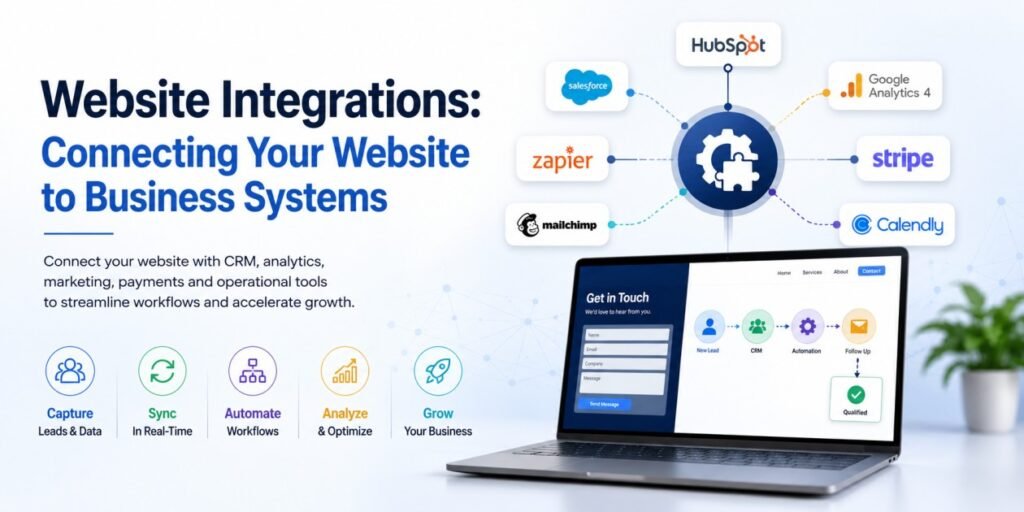
A modern business website rarely operates as an isolated digital asset. Visitors may submit forms, make purchases, book appointments, download resources, request information, or interact with content that needs to connect with systems beyond the website itself. Website integrations allow these interactions to move between the website and the business systems responsible for managing, measuring, and acting on that information.
Without the right integrations, businesses can end up managing information manually across disconnected platforms. Leads may need to be copied from website forms into a CRM, customer information may exist in multiple systems, marketing teams may lack timely data, and important actions may depend on someone remembering to move information from one tool to another.
A well-integrated website reduces this fragmentation by allowing relevant systems to communicate with one another. Depending on the business, this can include CRM platforms, analytics tools, payment gateways, scheduling systems, email marketing platforms, customer databases, business applications, and automation workflows.
This makes website integration an important part of Revenue-Focused Web Infrastructure™. The website is not simply where visitors interact with a business; it can also act as the digital connection point between customer experiences, business data, marketing systems, and operational workflows.
In this guide, we’ll explore how website integrations work, which systems businesses commonly connect to their websites, why disconnected systems create friction, how APIs and automation support integration, and how to build an integrated website infrastructure that can evolve with the business.
Table of Contents
What Are Website Integrations?
Website integrations connect a website with external platforms, applications, databases, or business systems so that information or actions can move between them.
The integration can be as simple as sending a website form submission into a CRM or as sophisticated as connecting multiple systems through APIs, webhooks, automation platforms, databases, and custom application logic.
A Website Is Often Part of a Larger Digital System
The visible website is only one part of the digital environment supporting a business. Behind the pages visitors see, there may be systems managing leads, customer records, payments, appointments, email communication, analytics, inventory, marketing campaigns, support requests, and internal operations.
When these systems are disconnected, the website can become a digital endpoint rather than an active part of the business workflow. Information may be captured successfully but then require manual processing before it becomes useful to another team or system.
Business website integration changes this relationship by allowing the website to participate directly in the flow of information and actions across the organization.
Integration Is More Than Adding a Plugin
A plugin or connector can sometimes provide a quick way to link two platforms, but effective integration requires more than installing a tool. Businesses need to understand what information should move, where it should go, when it should be transferred, and what should happen after the receiving system processes it.
For example, a website enquiry might need to create a CRM record, assign a lead source, notify a sales representative, trigger a confirmation email, start a follow-up workflow, and record the interaction for future reporting.
Each step creates dependencies that need to be considered during development. An integration that technically transfers data but creates duplicate records, loses important fields, or triggers unreliable workflows may introduce more operational problems than it solves.
The Goal Is Connected Information, Not More Technology
Adding more platforms does not automatically make a business more efficient. Every new system introduces another dependency that needs to be configured, maintained, secured, and understood by the people responsible for the digital environment.
The purpose of integration should therefore be to create useful connections between systems that genuinely need to communicate. The best integration strategy can sometimes involve simplifying the technology stack rather than continually adding new tools.
A connected website infrastructure should make important information easier to access, reduce unnecessary manual work, improve customer experiences, and give teams more reliable data for decision-making.
What Can a Website Integrate With?
The systems a website should connect with depend on the business model and customer journey. A lead-generation website may prioritize CRM and marketing integrations, while an ecommerce business may need payment, inventory, customer, and fulfillment systems. The right architecture starts with the workflows the business actually needs to support.
CRM and Lead Management Systems
A website can capture valuable information when someone submits a contact form, requests a consultation, downloads a resource, or completes another lead-generation action. Connecting those interactions with a CRM can allow the information to move directly into the system used to manage prospects and customer relationships.
A CRM website integration can pass information such as contact details, enquiry type, source, campaign information, service interest, and other relevant fields into the appropriate CRM record. This reduces manual data entry and gives sales or customer-facing teams faster access to new opportunities.
The integration can also support more structured lead journeys. Depending on the business, a new enquiry could trigger assignment rules, notifications, qualification workflows, follow-up activities, or other actions through AI Automation Infrastructure™ without requiring someone to manually initiate every step.
Marketing and Email Platforms
Websites can also connect with email marketing and marketing platforms to move customer interactions into appropriate communication journeys. Newsletter registrations, content downloads, product interest, event registrations, and other actions can provide useful signals for segmentation and follow-up.
The website can pass relevant information to the marketing platform while respecting the permissions and data requirements associated with customer communications. This creates a more connected experience between what a visitor does on the website and the communications they receive afterward.
For businesses running multiple acquisition channels, these connections can also help preserve information about where interactions originated and which campaigns or content contributed to subsequent actions.
Analytics and Measurement Platforms
Analytics integrations allow businesses to collect information about how people interact with the website and connect those interactions with broader measurement systems. Page views, events, forms, purchases, downloads, and other actions can provide insight into how visitors move through the customer journey.
The quality of this information depends on how the website and measurement systems are configured. Important actions need to be identified, tracking requirements need to be understood, and data should be structured consistently enough to support meaningful analysis.
This becomes particularly valuable when website activity needs to be evaluated alongside marketing performance and business outcomes rather than viewed as isolated website traffic. Performance Marketing Attribution can provide a deeper framework for understanding how different marketing interactions contribute to those outcomes.
Payment and Ecommerce Systems
For ecommerce websites, payment integration is a fundamental part of the customer journey. Customers need to be able to select products or services, complete payment securely, receive appropriate confirmation, and move into the next stage of fulfilment or service delivery.
Payment systems may also need to communicate with order management, inventory, accounting, customer records, shipping, subscriptions, or other business systems. The website therefore becomes part of a larger transactional infrastructure rather than simply displaying products.
The integration strategy should account for the complete transaction lifecycle, including successful payments, failed transactions, refunds, cancellations, notifications, and other states that the business needs to manage reliably.
Scheduling and Booking Systems
Service businesses often need their websites to connect with scheduling or booking platforms. Visitors may need to select a service, choose an available time, provide relevant information, receive confirmation, and potentially reschedule or cancel later.
A well-designed integration can reduce unnecessary movement between systems and create a smoother experience from the initial website interaction through to the scheduled appointment.
The business also benefits when booking information flows into the systems used for customer management, reminders, reporting, and operational planning.
How Website Integrations Create a Connected Customer Journey
The value of an integration is not simply that two platforms can exchange information. The greater opportunity is to connect the individual interactions a customer has with the business into a more coherent journey.
From Website Interaction to Business Action
Consider a visitor who arrives through a marketing campaign, reads a service page, submits an enquiry, receives confirmation, and is later contacted by the sales team. Without integration, each step may exist in a separate system and require manual coordination.
With an appropriately designed integration, the website interaction can become the starting point for a connected workflow. The enquiry can be recorded, its source can be preserved, the appropriate team can be notified, and subsequent actions can be triggered according to the business’s defined process.
This reduces the gap between what happens on the website and what happens inside the business after a visitor takes action. That connection is a central principle of Revenue-Focused Web Infrastructure, where the website is designed as part of the broader system supporting customer and business outcomes.
Reduce Manual Handoffs
Every manual handoff creates another opportunity for information to be delayed, entered incorrectly, overlooked, or lost. This can be particularly problematic when a business receives a high volume of enquiries or transactions.
Integrations can automate appropriate handoffs by moving information directly between systems according to predefined rules. The objective is not to automate every process, but to remove repetitive manual steps where automation can improve reliability and efficiency.
This can free teams to spend more time on activities that require human judgment, customer interaction, problem-solving, and decision-making.
Keep the Customer Experience Consistent
Connected systems can also help maintain consistency across different stages of the customer journey. Information captured on the website can inform follow-up communications, customer service interactions, appointment workflows, or other experiences that occur after the initial website visit.
This reduces the need for customers to repeatedly provide information they have already shared and helps teams understand the context behind each interaction.
The website therefore becomes more than a front-end interface. It becomes one connected touchpoint within a broader customer experience.
How Website Integrations Work
The technical method used to connect systems depends on the platforms involved, the type of data being exchanged, the frequency of communication, and how much control the business needs over the workflow.
APIs Connect Different Systems
An API, or application programming interface, allows software systems to communicate through defined requests and responses. In a website integration, an API can allow information captured by the website to be sent to another platform or allow the website to retrieve information from an external system.
For example, a website may use an API to send a new enquiry to a CRM, retrieve product information from an inventory system, verify a payment, display available appointments, or connect customer information with another business application.
The important consideration is not simply whether an API exists, but whether the integration is designed around the business workflow, data requirements, authentication, error handling, and expected future changes.
Webhooks Enable Event-Based Communication
Webhooks allow one system to send information to another when a specific event occurs. Instead of repeatedly asking whether something has changed, the receiving system can be notified when the relevant event happens.
For example, a successful payment, new form submission, appointment booking, account creation, or status change could trigger information to be sent to another system for processing.
This can make integrations more responsive and reduce unnecessary communication between systems. However, webhooks still need appropriate validation, error handling, security controls, and monitoring to ensure that important events are processed reliably.
Automation Platforms Can Connect Systems Without Custom Development
Not every integration requires a custom development project. Depending on the systems involved, automation platforms can connect applications through predefined triggers, actions, and workflows.
This can be useful for relatively straightforward processes such as sending form submissions to a CRM, adding contacts to a marketing platform, notifying internal teams, or creating tasks when a specific website action occurs.
The important consideration is whether the chosen approach provides enough control, reliability, security, and scalability for the business. A simple connector may be appropriate for one workflow but unsuitable for a high-volume or highly customized process.
Common Website Integration Challenges
Integrating systems can create significant value, but poorly planned integrations can introduce new technical and operational problems. Understanding the common challenges before development helps businesses design a more reliable digital infrastructure.
Inconsistent or Duplicate Data
Different systems may store customer information using different fields, formats, naming conventions, or identifiers. Without a clear data structure, the same customer can end up with multiple records or incomplete information across platforms.
A strong integration strategy should establish which system is responsible for specific information, which fields need to be transferred, how records are matched, and how changes are handled.
Data consistency becomes particularly important as the number of connected platforms grows. What appears to be a small integration issue can become much more difficult to manage when the same information is being exchanged across several systems.
Integration Failures and Missing Data
Integrations can fail for many reasons, including API changes, authentication problems, service interruptions, invalid data, configuration errors, or changes to the connected platforms.
Important workflows should therefore include appropriate error handling and monitoring. If a lead fails to reach the CRM or a payment event is not processed correctly, the business needs a way to identify and address the problem.
Reliability should be considered part of the integration architecture rather than something left to discover after an important workflow fails.
Third-Party Dependencies
Every external platform connected to a website introduces a dependency. Changes to pricing, APIs, functionality, authentication requirements, availability, or support can potentially affect the website’s workflows.
Businesses should therefore understand which integrations are critical, which alternatives may exist, and what happens if an external service becomes unavailable.
This doesn’t mean avoiding third-party platforms. It means designing integrations with enough visibility and resilience that the business understands the dependencies supporting its digital environment.
Security and Data Protection
Integrations often involve customer information, payment data, business records, authentication credentials, or other sensitive operational information. The way this information moves between systems therefore needs to be considered during architecture and development.
Access permissions, authentication methods, data transmission, credential management, logging, and the amount of information shared between systems should all be evaluated according to the specific integration and business requirements.
The principle is straightforward: connect only what needs to be connected, transfer only what needs to be transferred, and protect the information throughout the process.
How to Plan a Website Integration Strategy
The strongest integrations begin with business requirements rather than technology. Before connecting platforms, businesses should understand what information needs to move, why it needs to move, who uses it, and what should happen after each important website interaction.
Map the Business Workflow First
Start by documenting the journey from the website interaction to the desired business outcome. For example, a visitor may submit a consultation request, become a new lead, receive confirmation, enter a qualification process, and eventually become a customer.
Each stage can then be mapped to the system responsible for handling it. This helps identify which information needs to move between the website, CRM, marketing platform, internal systems, and other tools.
Mapping the workflow before selecting an integration method prevents businesses from choosing technology first and then trying to force their processes into whatever the technology happens to support.
Define the Data That Needs to Move
Not every piece of information needs to be transferred between every connected platform. Determine which fields are necessary for each workflow and where the authoritative version of that information should exist.
A clear data map can reduce duplication, unnecessary transfers, and confusion about which system should be trusted when information changes.
This becomes increasingly valuable as the digital environment grows because a well-defined data structure makes future integrations easier to plan and maintain.
Choose the Right Integration Method
Once the workflow and data requirements are understood, determine whether the appropriate solution is a native integration, automation platform, API connection, webhook, custom development, or a combination of approaches.
The choice should consider complexity, volume, reliability, security, maintenance requirements, budget, and how much control the business needs over the integration.
The simplest solution that reliably supports the required workflow is often preferable to a technically complex implementation that creates unnecessary maintenance overhead.
Build Integrations That Can Evolve With the Business
An integration that works today may need to support very different requirements as the business grows. More traffic, additional customer journeys, new platforms, larger data volumes, and increasingly complex workflows can all change what the website needs to connect with.
Avoid Building Unnecessary Dependencies
Every integration adds another relationship that needs to be maintained. Before connecting a new platform, businesses should consider whether the integration solves a meaningful problem, whether the information is genuinely required, and whether the same outcome can be achieved with fewer dependencies.
A simpler architecture can often be easier to maintain, troubleshoot, secure, and scale. The goal is not to create the largest possible network of connected tools, but to build the smallest reliable system that supports the required customer and business workflows.
This principle becomes particularly important as a website evolves from a simple marketing presence into a more connected digital business environment.
Design for Future Integration Requirements
Future requirements cannot always be predicted, but the architecture can be designed to make change easier. Clear interfaces, modular components, structured data, documented integrations, and sensible separation between systems can reduce the complexity of future development.
This allows new platforms or workflows to be introduced without forcing major changes throughout the existing website. It also gives development teams a clearer understanding of how new functionality should interact with the systems already in place.
In this sense, integration planning is part of scalable website development. The objective is to create a foundation that can accommodate changing business requirements without becoming increasingly difficult to manage.
The Mavenify Approach to Connected Website Infrastructure
At Mavenify, website integrations are considered part of the website’s underlying business infrastructure rather than optional technical additions. The objective is to create a website that can communicate effectively with the systems responsible for customer management, marketing, analytics, transactions, scheduling, automation, and other business processes. This approach is part of Revenue-Focused Web Infrastructure™, where website strategy, development, integrations, and performance are designed to work together as a connected digital foundation.
This starts with understanding the business workflow rather than selecting technologies first. The website architecture, integration requirements, data flows, user journeys, and operational needs are considered together so that the resulting development supports how the business actually operates.
The result is a more connected digital environment where the website can function as an active part of the business rather than an isolated front-end.
Integrations Within the Broader Growth System
A connected website can support multiple parts of the growth environment. Acquisition systems can send relevant visitors to the website, conversion architecture can guide those visitors toward meaningful actions, analytics can capture what happens, and connected business systems can continue the process after the website interaction.
This is why Mavenify’s approach connects website development with its broader Growth Systems™ framework rather than treating development, marketing, automation, and measurement as completely separate activities.
Integration Should Improve the Business, Not Just the Technology
The success of an integration should ultimately be measured by what it enables the business to do better. That could mean responding to leads faster, reducing manual data entry, improving customer experiences, making reporting more reliable, simplifying transactions, or creating more efficient operational workflows.
Technology is simply the mechanism that enables those improvements. A technically sophisticated integration has little value if it adds unnecessary complexity without improving a meaningful customer or business process.
The strongest website integration strategies therefore begin with business outcomes and work backward toward the appropriate technical solution.
Frequently Asked Questions About Website Integrations
What are website integrations?
Website integrations connect a website with external platforms, applications, databases, or business systems so that information and actions can move between them.
Why are website integrations important for businesses?
Website integrations can reduce manual data entry, connect customer interactions with business systems, improve workflow efficiency, support better customer experiences, and make information available to the teams and platforms that need it.
What systems can a website integrate with?
A website can integrate with many types of systems, including CRM platforms, analytics tools, payment gateways, email marketing platforms, scheduling systems, ecommerce platforms, databases, customer support tools, business applications, and automation platforms.
What is CRM website integration?
CRM website integration connects website interactions such as forms, enquiries, registrations, or purchases with a customer relationship management system. Depending on the implementation, information can be transferred automatically and used to support lead management, follow-up, reporting, and customer workflows.
What is a website API integration?
A website API integration allows the website to communicate with another application through an application programming interface. APIs can be used to send or retrieve information between systems according to defined technical rules.
Do all website integrations require custom development?
No. Some platforms provide native integrations or can be connected through automation tools. More complex requirements may need API connections, webhooks, middleware, or custom development. The appropriate approach depends on the workflow, systems involved, data requirements, security, and scalability needs.
Can website integrations improve lead generation?
They can improve the processes surrounding lead generation by connecting forms and other conversion actions with CRM, marketing, notification, qualification, and follow-up systems. The integration itself does not generate demand, but it can make the journey after a visitor takes action more efficient and reliable.
How do website integrations affect website performance?
Third-party integrations can affect performance if they introduce excessive scripts, requests, processing, or dependencies. Integrations should therefore be evaluated not only for functionality but also for their impact on page performance, reliability, and the overall user experience.
How should businesses choose which systems to integrate?
Start with the business workflow rather than the technology. Identify important customer and operational journeys, determine what information needs to move between systems, establish which platform should be the source of truth, and then choose the simplest reliable integration method that supports those requirements.
Can existing websites be integrated with business systems?
Yes. Existing websites can often be connected to CRM, analytics, payment, scheduling, marketing, and other systems. The available options depend on the website’s technology, existing architecture, APIs, third-party platforms, and the complexity of the required workflow.
Conclusion
A website becomes considerably more useful to a business when it can communicate with the systems around it. Forms, payments, analytics, CRM records, bookings, marketing interactions, and other website activities can become part of connected workflows rather than isolated events.
The goal, however, is not to connect every available platform. Effective website integrations are built around meaningful business requirements, reliable data flows, appropriate technology, security, maintainability, and the customer journeys the website needs to support.
When integrations are designed as part of the wider website architecture, the website can become a more capable digital foundation—one that supports acquisition, conversion, customer management, measurement, and operational growth.
That is the role of connected website infrastructure: not simply to make systems communicate, but to make the business work more effectively through the digital environment.
Build a Website That Works With Your Business
If your website currently operates separately from your CRM, marketing platforms, analytics, payment systems, scheduling tools, or other business applications, valuable information and opportunities may be getting lost between systems.
Mavenify’s Revenue-Focused Web Infrastructure™ combines website strategy, architecture, development, integrations, performance, conversion, and scalability to create a digital foundation designed around how your business actually operates and grows.